
No contact app: how Zero Contact helps you keep no contact
A good no contact app should do one thing well: help you not text them. We built the Zero Contact app for the moments when willpower runs out: late nights, bad days, the minute after a sad song. Here's what it does, what's free, and how it protects your privacy.
What a no contact app should do
- Show your progress, so each day feels like something you built.
- Help in the exact moment of an urge, not just with general advice.
- Give you somewhere to say what you want to say, without sending it.
- Make tempting apps harder to open when you're at your weakest.
- Keep your private thoughts private.
1. A live no contact streak
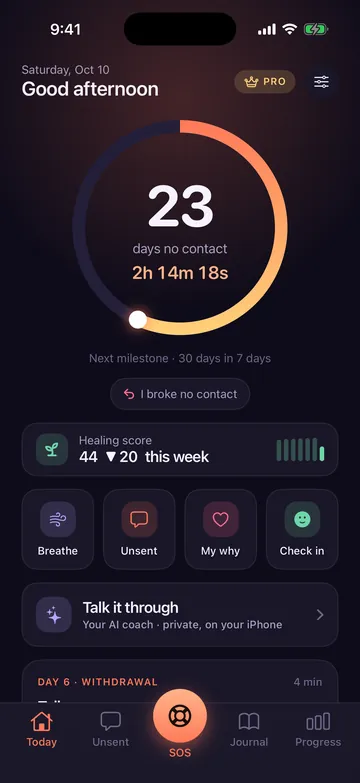
The Today screen shows how long you've kept no contact, counting every second, with your healing score and milestones at 24 hours, 1 week, 30, 60 and 90 days, then 6 months and a year. Widgets keep it on your Home Screen. If you slip, tap “I broke no contact”: your current streak restarts, but your longest streak and your history stay.
2. SOS for urges
3. A private AI coach
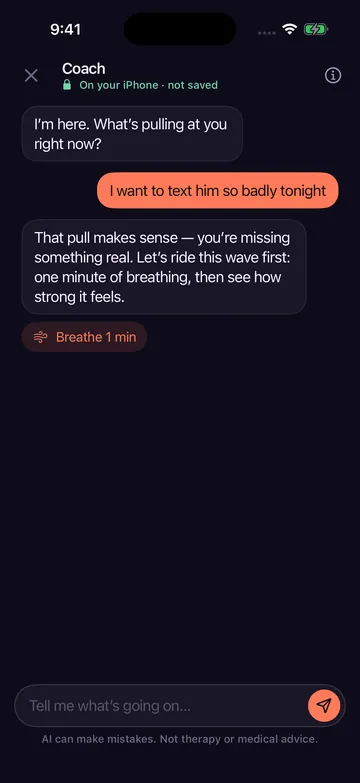
When you need to talk it through, the coach answers with care. It runs entirely on your iPhone with Apple Intelligence, so conversations are processed on your device, never sent to us and not saved. It only helps with your breakup and no contact, and it won't help you write to your ex. Free includes 3 messages a day; Pro is unlimited. It needs an iPhone that supports Apple Intelligence (iPhone 15 Pro or later).
4. Unsent
Say everything you want to say to them in a chat that looks and feels like sending, and never sends. With Pro, a reality check shows how it usually goes (read, ignored, or “k”), and you can burn the chat when you're ready.
5. Emergency Mode
Using Apple's Screen Time, Emergency Mode blocks the apps you choose (Messages, Instagram, anything) for 15 minutes to 3 hours. You can end it early after a 60-second breathing pause. Zero Contact never sees which apps you choose or how you use them.
6. A 90-day plan
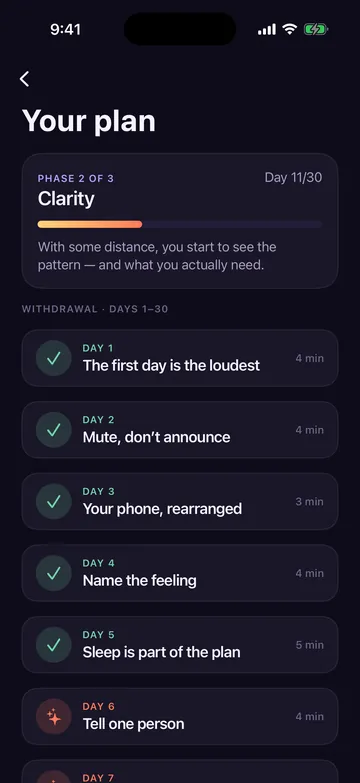
Short daily lessons in three phases: Withdrawal (days 1–30, survive the urges), Clarity (days 31–60, see the pattern) and Self-respect (days 61–90, rebuild you). Alongside it: a journal, a reasons vault, letters to your future self, and Sol, a small plant that grows with your streak.
Private by design
- No account and no sign-up.
- Your journal, unsent messages, reasons and letters stay on your iPhone, or in your private iCloud if you turn sync on.
- Notifications never show their name or anything you wrote.
- The details are in our privacy policy.
Free vs Pro
Your streak, SOS, check-ins, Unsent, the coach (3 messages a day) and the first week of the plan are free. Zero Contact Pro unlocks the full 90-day plan, Emergency Mode, unlimited coach and Unsent chats, the reasons vault with Face ID, letters, Sol, iCloud sync, PDF export, the Lock Screen urge timer, every widget and no ads. It's available weekly, yearly with a 3-day free trial, or as a one-time lifetime purchase; prices are shown in the app in your currency. More answers in the Zero Contact FAQ.
Frequently asked questions
Is the Zero Contact app free?
Yes, the core features are free and need no account. Pro is optional and unlocks the full plan, Emergency Mode, the unlimited coach and more.
Is there a no contact app for Android?
Zero Contact is currently available for iPhone and iPad only.
Can the app read my messages to my ex?
No. Zero Contact can't read your messages or other apps. What you write inside Zero Contact stays on your device.

From searching for a no contact app to day one
Download Zero Contact, set your start date and your why, and let the app carry some of the weight. Free to start, no account.

Zero Contact is a self-help tool, not therapy or medical care. If you are in danger or thinking about hurting yourself, contact your local emergency number or find a helpline at findahelpline.com.